SortScreen —
Stop Drowning in Screenshots
I built SortScreen because I was tired of scrolling through an endless mess of screenshots to find that one receipt or that one meme. It's a small Android app that helps you tame the screenshot chaos — entirely on your device, no account, no cloud, nothing leaving your phone.
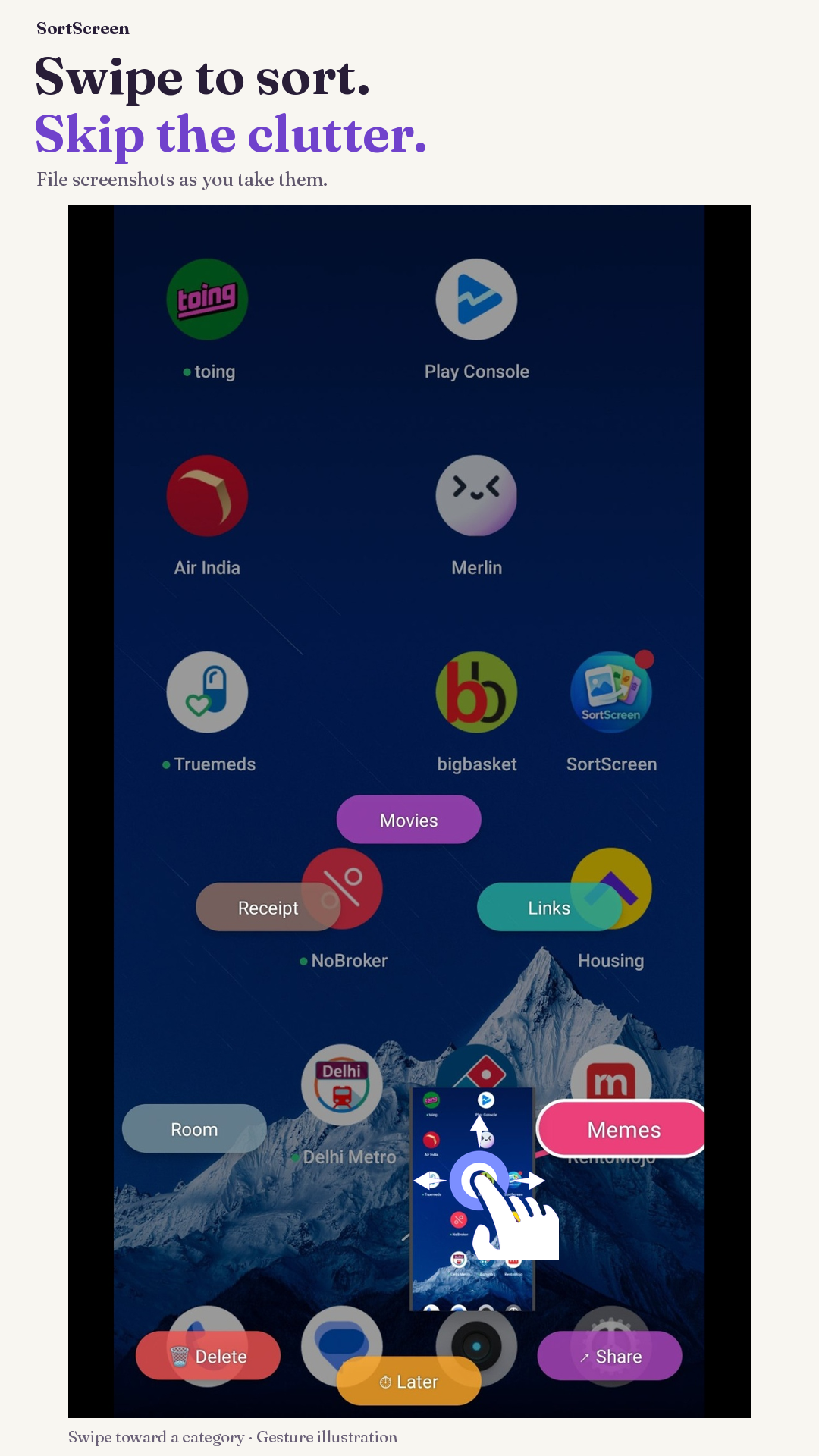
Screenshot 1 of 4: Capture. Gesture illustrations and test ads are included.
Every phone ends up with hundreds of screenshots.
Receipts, directions, memes, conversations, articles, QR codes. They pile up in your gallery, unnamed and unsorted, until finding anything feels impossible.
I wanted to fix that for myself, and figured other people probably deal with the same thing. So I built SortScreen — a little Android tool to help you take control of your screenshots. Sort them as you take them, batch-organize them later, or just let the app help you clean up the backlog. The goal is simple: make this everyday task a bit less tedious and maybe even a little fun.
Core Features
Designed for Speed, Privacy, and Control
Capture Overlay — Sort As You Go
The moment you take a screenshot, SortScreen pops up a small floating overlay on your screen. Without leaving what you were doing, drag the screenshot toward a category — Receipts, Work, Social, Memes, Links, or any custom group you've made — and it's filed instantly.
Tap Delete to get rid of it. Tap Later to schedule automatic deletion after a delay you choose. If you ignore it, the overlay dismisses itself after about 12 seconds.
Gallery — Your Screenshots, Organized
The SortScreen gallery organizes your screenshots into albums, with category names and item counts. Switch between Albums, Photos, and Clean using the bottom navigation. Tap any screenshot to view it full-screen, swipe between shots, share, edit, or delete.
Unsorted screenshots appear in their own section. There's also a Trash view and an Auto-delete album for screenshots queued up for timed deletion.
Clean Mode — Tackle the Backlog
Got a mountain of old screenshots? Clean mode lets you swipe through them quickly — left to delete, right to keep — or use the radial dial to file into a specific category.
Clean includes 15 actions per 12-hour period; completing a rewarded ad adds 15 more.
Timed Deletion — Delete Later
When you choose "Later" in the overlay or Clean mode, SortScreen schedules that screenshot for automatic deletion after a delay you set (1 minute to 1 day).
The timer keeps ticking even if you restart your phone. No manual cleanup needed.
Smart Trash
By default, "Delete" moves screenshots to Android's system trash — so they're recoverable for about 30 days through the Files app, Google Photos, or your gallery's trash.
If you prefer permanent deletion, you can switch that in Settings.
Automatic Screenshot Detection
SortScreen's background service watches your screenshots folder so the overlay appears right after you capture something.
Detection timing varies with Android and battery settings.
Privacy and Permissions
Nothing Leaves Your Device
SortScreen doesn't upload, transmit, or store your screenshots anywhere outside your device. All the organizing, categorizing, and file operations happen locally.
Required Permissions:
| Permission | Why |
|---|---|
Photo / media access READ_MEDIA_IMAGES | To read your screenshots so the app can display and organize them |
Notifications POST_NOTIFICATIONS | Android needs this to keep the detection service running in the background |
Display over other apps SYSTEM_ALERT_WINDOW | To show the capture overlay over your current app when you take a screenshot |
Optional Permissions for Extra Features:
| Permission | What It Unlocks |
|---|---|
Manage screenshots MANAGE_MEDIA | Optional on Android 12+: reduces repeated trash/delete confirmations. |
| Battery exemption | Keeps detection reliable on phones that aggressively manage background apps |
Simple Pricing
Free with optional rewarded ads
Use the current release for free with ads. Complete a rewarded ad when you want extra Clean actions.
Full Feature Access
Full screenshot organization, capture overlay, Clean mode, timed deletion, and category management. Shows Google AdMob banner and rewarded ads.
- Floating capture overlay & instant filing
- Categorized gallery & smart trash integration
- Clean mode backlog triage
- Timed deletion ("Delete later")
- •Supported by AdMob banner & rewarded ads
Need more Clean actions?
Complete an optional rewarded ad to earn 15 extra actions. Ads need internet access and may not always be available. Extra actions are granted after an earned completion.
Ready to take control of your screenshot gallery?
Get SortScreen on Google Play and start organizing your screenshots on your device.
Requires Android 8 or newer. Includes Google AdMob ads. Optional Manage screenshots access requires Android 12 or newer.
SortScreen by OddStuff. Your screenshots stay on your phone.